🔒 Subscribers only. Don’t share.

Written by Robbin Kleinpenning
🔒 This content is for my newsletter subscribers only. Please don’t share it.
If you’ve ever tried picking a Shopify theme, you know the feeling.
You look at one theme and think, “Wow, this is perfect.”
But then you click on another one and it looks even better.
Then you start reading reviews about speed, features, and conversion rate optimization, and suddenly you’re 30 tabs deep and completely overwhelmed.
That was me.
So I decided to stop guessing and actually break it down. Because when it comes to Shopify themes, you really only have five options.
- Free theme from the official Shopify Theme Store
- Paid theme from the official Shopify Theme Store
- Paid third-party theme from providers such as ThemeForest.net
- Page builder app, such as PageFly or GemPages
- Fully custom build
But that led me to the ultimate question:
If free themes exist, why would anyone spend money on a Shopify theme?
Some people say paid themes have better design, offer more features out of the box, and are easier to set up.
But are those claims actually true?
To find out, I decided to put it to the test by comparing the most popular paid Shopify theme with the best free Shopify theme.
After doing a quick search, I found that the paid Shopify theme called Impulse has the most reviews. In other words, it’s probably one of the most popular options. It has more than 1,200 reviews.
As for the best free theme, if you watched my video where I researched the best free Shopify theme, you already know the conclusion was that Horizon is the best free Shopify theme.
So I chose Horizon for this comparison.
If you want to know why, watch the video below for all the details.
Anyway, I put the $400 paid Shopify theme Impulse to the test and compared its features with the free Shopify theme Horizon.
What you see in the image below is the Impulse demo website.
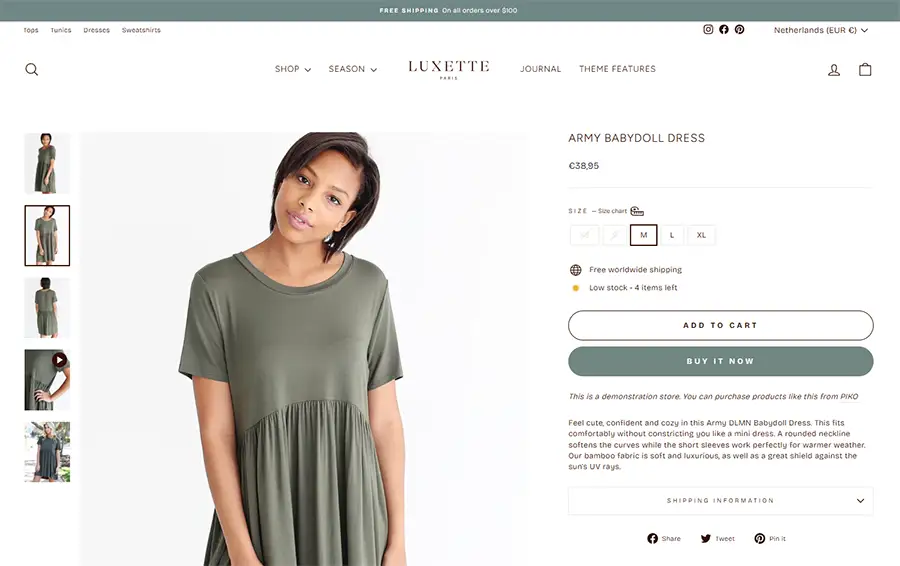
You can also visit the demo store directly by clicking here.
What you see in the image below is the Mare & Vale store I created using the Horizon theme and its AI features. My goal was to replicate the Impulse theme as closely as possible to see if and where I would run into limitations with the Horizon theme.
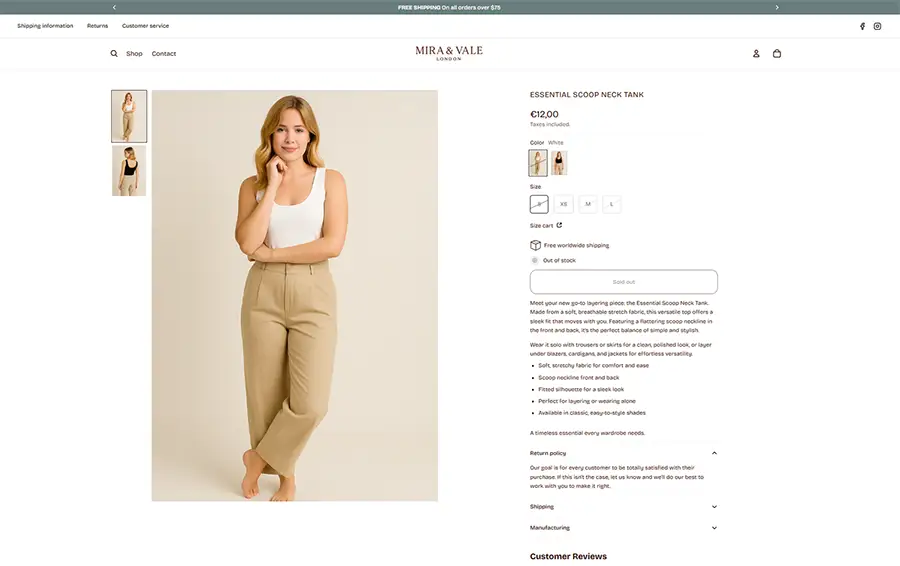
This is the store I created using Horizon and AI. You can view the store here. Since it’s currently password-protected, use the following password to access it:
Password: mowlew
As you can see by browsing the store’s homepage, header, mega menu, product pages, and collection pages, the two stores look very similar.
In other words, I was able to replicate a $400 store design using the $0 Horizon theme.
Horizon’s Limitations
So is there really nothing the Impulse theme could do that I couldn’t replicate with the Horizon theme?
There were a few things I couldn’t replicate easily.
- The Impulse theme automatically plays videos on product pages. The Horizon theme does not. You can accomplish this by tweaking the code of your Horizon theme, but I have not tried that yet.
- Another small difference is the out of stock option. The Impulse theme also shows the exact number of items left in stock, while with Horizon you have to choose between showing low stock or displaying the exact number remaining.
- One thing the Horizon theme does not offer is a recently viewed section that shows products the customer recently looked at. You can add this with some custom code, but it is not something the Horizon theme currently offers by default. The Impulse theme apparently does include this feature.
Other than these three things, I did not experience any major limitations while using the $0 Horizon theme.
Conclusion
As I mentioned at the beginning, you basically have five main options: use a free theme like Horizon, buy a paid theme from Shopify such as the $400 Impulse theme, buy a paid theme from a third party, use a page builder app to design your store, or build a fully custom store.
To understand which path is best for your Shopify store, we need to evaluate these options from three different angles. After going through them, you will understand what the five options are, what they mean, and which one I recommend.
We will look at:
- Functionalities
- Risks
- Cost
Functionalities
Let’s first talk about functionality.
By now, you know the free Horizon Shopify theme can take you a really long way, maybe even further than you would expect. I was able to build a store with Horizon that closely replicates a $400 paid theme, all using a free theme.
You can view the store here. Since it’s currently password-protected, use the following password to access it. Password: mowlew
In other words, while functionality used to be one of the main reasons to choose a paid theme, a lot has changed since Shopify launched Horizon in 2025. Horizon is much more flexible than Shopify’s older free themes, which significantly reduces the need to spend hundreds of dollars on a paid one.
And even though I mostly compared Horizon to Impulse, a $400 paid theme, I would say the same thing about other options such as page builder apps or custom theme builds.
In my opinion, when it comes to functionality, I would not choose a page builder app to build my Shopify store. It is just another monthly subscription. And does it really give you that much additional benefit? As you have seen, I was able to build a professional looking store that resembles a $400 paid theme simply by using Horizon.
The same applies to custom builds. A lot of people think they need a custom theme. But do they really? Or do they just need one specific functionality?
If it is the second, can you clearly describe that feature? If the answer is yes, I would recommend first building your store with Horizon and then hiring someone to create that specific feature for you, rather than paying an agency to build an entire custom theme from scratch. There is simply no need to reinvent the wheel if you only need one specific component.
Risk
And I have not even talked about the risks yet.
From a risk perspective, Horizon is the safest option because Shopify itself builds and maintains it. That means it will continue to receive updates whenever the platform changes.
With a paid theme, a page builder app, or a fully custom theme, you are relying on a third party company or developer. If that company slows down or disappears, you could end up with a theme that no longer receives updates.
Shopify does remove inactive themes from the theme store, but they do not step in to maintain those themes if the company behind them disappears. In other words, once the developer stops supporting the theme, you are on your own.
That is why, if you decide to go with a paid theme, it is smarter to choose one from a more established company rather than a newcomer. A developer with a longer track record and a larger team is far less likely to disappear compared to a smaller company that may not yet have the revenue or stability to sustain its business.
Cost
Now let’s talk about cost.
Horizon is completely free. A paid Shopify theme is usually a one time purchase of around $300 to $500. A page builder app typically costs anywhere from $0 to $60 per month, which works out to roughly $300 to $400 per year. And if you go for a fully custom theme, you are looking at thousands of dollars.
So the bottom line is this: considering the functionality of Horizon compared to paid themes, along with the risks and costs we discussed, I would still choose the free Shopify Horizon theme.
What if money is no object?
Now you might be wondering if my conclusion would change if budget was not a factor. Honestly, not that much. Here is why.
Functionality: Even with unlimited money, you are not necessarily getting more functionality with a paid or custom theme compared to Horizon. In fact, you might end up with less if the custom build does not keep up with Shopify’s updates. Horizon will continue to evolve alongside Shopify.
Speed to launch: If money is not a concern, you could hire an agency to build a completely custom store from scratch. But ask yourself if you really need something that custom. Most businesses do not, and it will likely slow you down. A free theme gets you live faster, and you can always add custom development later for the one or two features Horizon does not cover.
Risk: Money does not remove risk. You can buy a $400 theme or pay $20,000 for a custom build, but if the developer disappears or the theme company stops releasing updates, you are stuck. Shopify itself is the safest long term option, and Horizon comes directly from them.
Where spending does make sense: If money is unlimited, I would recommend putting it toward areas other than your website design. For example, ads, professional product photography, branding, copywriting, or custom development for one or two features that actually improve conversion. Those things will likely have a much bigger impact than spending money on a theme just because you can.
So the bottom line is this: even if money were no object, I would still start with Horizon. The difference is that with a larger budget, I would invest more in improving the content and overall experience around the theme instead of reinventing the wheel with the theme itself.
Final Thoughts
So the bottom line is this: considering the functionality of Horizon compared to paid themes, along with the risks and costs we discussed, I would still choose the free Shopify Horizon theme.
What surprised me most while doing this comparison was just how far you can push Horizon when you combine it with the newer AI features inside Shopify.
The Mare & Vale store I showed earlier is a good example of that (password: mowlew). The goal of that experiment was simple: recreate the look and feel of a $400 premium Shopify theme using only the free Horizon theme. And as you saw, the result ended up looking almost identical.
Once you understand how to structure your pages, configure sections correctly, and use AI tools to speed up the design process, you can replicate many premium Shopify store designs without paying hundreds of dollars for a theme.
That’s exactly why I decided to turn the entire process into a step-by-step training.
Instead of figuring everything out through trial and error, I recorded the full workflow showing how to rebuild the Mare & Vale store design from scratch using the free Horizon theme.
If you want to follow the exact same process I used, you can check out my course here:
👉 Shopify Website Design Masterclass
Inside the course you’ll learn how to:
- Install and configure the Horizon theme properly
- Structure your store using collections and a professional mega menu
- Design a clean, high-converting homepage
- Build professional product and collection pages
- Use Shopify’s AI features to speed up the entire design process
- Recreate premium-looking Shopify store designs without paying $400 for themes
The course includes 28 step-by-step lessons showing exactly how to rebuild the store I demonstrated in this article.
So if you’d like to stop overpaying for Shopify themes and instead learn how to recreate them yourself using AI + the free Horizon theme, you can get instant access here:
🚀 Start the Shopify Website Design Masterclass →
The course comes with a 14-day money-back guarantee.
Once you understand this process, you’ll never need to buy a $400 Shopify theme again.